
Two surfaces, one auth
- REST API —
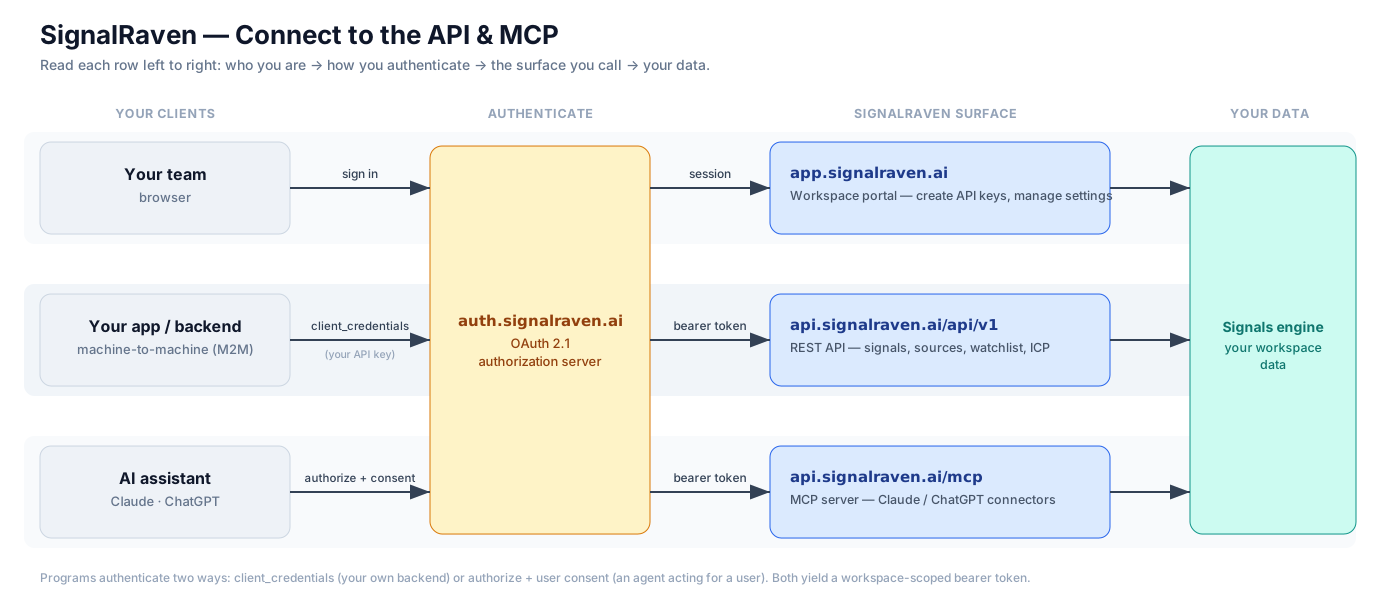
api.signalraven.ai/api/v1— for your own backend, scripts, and data pipelines. - MCP server —
api.signalraven.ai/mcp— for AI assistants like Claude and ChatGPT.
Both authenticate with OAuth 2.1 via auth.signalraven.ai and return the same workspace-scoped data. Reads are unrestricted; anything that spends credits or changes where signals are delivered sits behind its own write scope, named on the consent screen. Nothing on either surface can touch a LinkedIn account.
REST API
API reference →
Endpoints, scopes, auth, examples.
MCP · REFERENCE
MCP server →
Tools, transport, discovery, for building against it.
MCP · SET UP
Connect Claude / ChatGPT →
Add the connector and start asking. No code.
Get started
- Create an API key at
app.signalraven.ai→ Settings → API keys (workspace admin). You’ll get a client id + secret once. - Exchange it for a token at
auth.signalraven.ai/oauth2/tokenusing the OAuthclient_credentialsgrant. - Call the API or MCP server with the bearer token. See the REST reference or MCP reference.
Prefer to explore first? The public API is a Postman collection with every endpoint, and the OpenAPI document is at api.signalraven.ai/openapi.json.
Where it’s listed
- RapidAPI: the REST API with a free plan of 1,000 requests a month.
- Postman API Network: the public workspace and published docs.
- signalraven-open on GitHub: the OpenAPI document, the Postman collection, n8n templates, and the Claude Code plugin.
- The MCP server: the official MCP registry, Smithery, Glama, and a Gemini CLI extension.